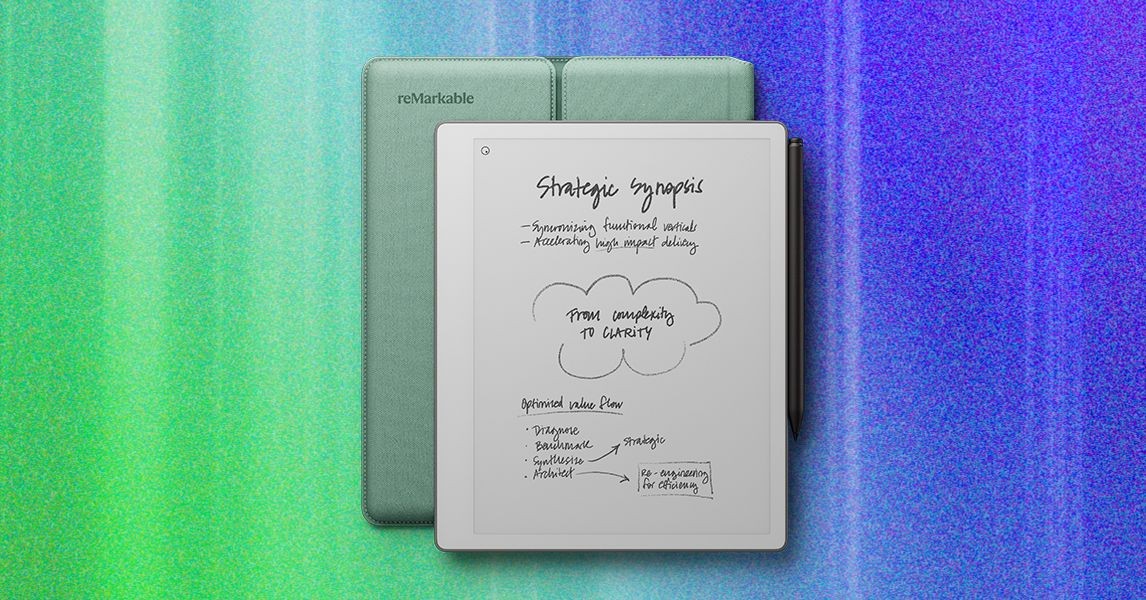
ReMarkable is reshaping its digital notebook lineup with the launch of the ReMarkable Paper Pure, a device designed to strip away distractions and focus exclusively on the writing experience. Priced at $399, the Paper Pure replaces the six-year-old ReMarkable 2, marking a significant shift in naming convention and product philosophy. While it retains the core appeal of its predecessor—minimalist design and paper-like writing—it makes deliberate trade-offs, notably removing front lighting and keyboard accessories to maintain a lower price point and singular purpose.
Design and Build: Lighter, Brighter, Simpler
At first glance, the Paper Pure bears a strong resemblance to its predecessor, the ReMarkable 2, but subtle refinements make a tangible difference in daily use. Both devices feature a 10.3-inch e-ink display, yet the Paper Pure feels more compact due to a shortened bottom bezel. This design tweak, combined with a recycled aluminum frame, reduces the weight from 0.89 pounds to 0.79 pounds. While the difference seems minor, it significantly enhances comfort during prolonged writing sessions.
A key ergonomic improvement is the retention of the thicker side bezel. Unlike the newer, more expensive Paper Pro models which feature edge-to-edge screens, the Paper Pure’s bezel provides a natural resting spot for the thumb. This allows for secure handling and easy rotation, catering comfortably to both right- and left-handed users.
The writing experience itself remains the device’s strongest asset. ReMarkable has transferred the tactile feedback technology from its premium Paper Pro line to this model. The screen offers a slight texture that mimics the friction of pen on paper, providing resistance without feeling gritty or slow. For many users, this paper-like sensation is the primary reason for choosing a ReMarkable over competitors, and it remains uncompromised here.
Display and Battery: Trade-Offs for Endurance
The Paper Pure embraces a monochrome, non-lit display, a choice that defines its identity as a “pure” writing tool.
- No Front Light: The device lacks built-in front lighting. In well-lit environments, the screen appears exceptionally bright and white—a feature ReMarkable claims is the best in the market. However, this limitation becomes apparent in low-light settings, such as dark classrooms or evening study sessions, where a front light would be essential for readability.
- Enhanced Battery Life: The removal of lighting components contributes to a significant boost in battery performance. While previous ReMarkable models and competitors like the Kindle Scribe typically offer around two weeks of battery life, the Paper Pure promises up to three weeks on a single charge. This makes it a highly convenient tool for users who dislike frequent charging cycles.
Software: Smarter Note-Taking and Integration
ReMarkable is launching the Paper Pure alongside major software updates that enhance productivity across its entire ecosystem. These features aim to bridge the gap between digital notes and daily workflow.
Calendar Integration
The new calendar feature integrates directly with Google and Outlook. A dedicated icon on the home screen provides a quick view of upcoming meetings. When a meeting begins, the device automatically generates a note template populated with details from the calendar invite, creating a dedicated space for meeting minutes. While currently limited to a single primary calendar (excluding shared or secondary calendars), this feature streamlines the transition from scheduling to note-taking.
Convert and Share
For collaboration, the “Convert and Share” tool allows users to transform handwritten notes into typed, searchable summaries. Users can generate a shareable link via the ReMarkable web application, allowing colleagues or students to view both the typed summary and the original handwritten notes side-by-side. This functionality eliminates the need for manual transcription and makes digital notes accessible to those without a ReMarkable account.
Additionally, screen sharing capabilities have been added to the web app, enabling users to project their notes during virtual meetings, effectively turning the tablet into a collaborative whiteboard.
The Accessory Gap: A Significant Limitation
The most notable drawback of the Paper Pure is the absence of a keyboard folio. Previous models, including the ReMarkable 2 and the Paper Pro, offered keyboard attachments that allowed the device to function as a lightweight e-ink laptop.
The Paper Pure only supports a protective folio that slides out rather than folding open. While the folio comes in several colorful options that add a touch of personality, the lack of a keyboard option limits the device’s versatility. Students or professionals who rely on typing for extensive note-taking or document creation may find this restrictive. Although ReMarkable has not ruled out future keyboard accessories, their absence currently forces users into a higher-priced tier (the Paper Pro) if they require typing capabilities.
Conclusion
The ReMarkable Paper Pure is a refined, focused tool for those who prioritize handwriting and minimalism. It offers improved ergonomics, superior battery life, and useful software integrations at a competitive price. However, the lack of front lighting and keyboard support means it is not a one-size-fits-all solution. It is best suited for users who want a distraction-free digital notebook for handwritten notes in well-lit environments, rather than a versatile all-in-one productivity device.